Help Center/Email/Email bounced

My email bounced: what the message means.

That "Undeliverable" email looks scary, but it usually says exactly what is wrong. Here is how to read it, and what to do next.

About 5 minutes Outlook for Windows (Classic & New) Microsoft 365 & Skytech-hosted email
The bounce messageIt arrives in your Inbox soon after you send, often from "Mail Delivery System" or "Postmaster".
Two minutesMost bounces are a typo in the address.
A way to contact the personIf the address is wrong, a quick call gets you the right one.

What a bounce looks like

A bounce (also called an undeliverable message or NDR) is an automatic email telling you your message did not arrive. The subject usually starts with Undeliverable, Delivery Status Notification (Failure) or Mail delivery failed.
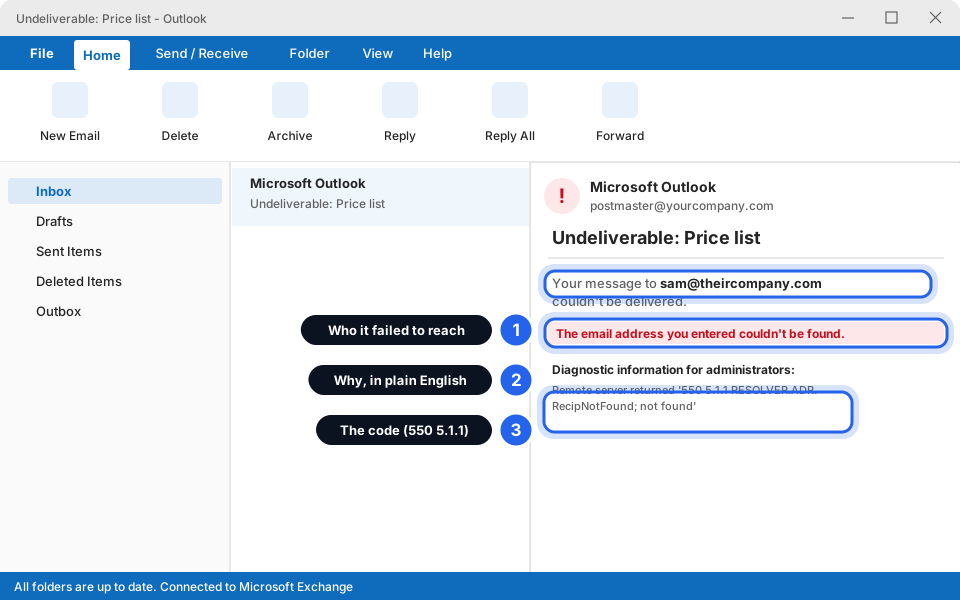
An Undeliverable message open in Outlook, with callouts on who it failed to reach, the plain-English reason and the code
Three things matter: who, why, and the code.Click picture to enlarge
1. Who
The address it could not reach. Check it for typos first.
2. Why
A sentence in plain English, such as "couldn't be found" or "mailbox is full". Read this line first.
3. The code
Numbers like 550 5.1.1. They help us. The first digit matters: 5 means it failed for good, 4 means a temporary problem and the system is still trying.

Decode the message

Find the words or numbers from your bounce in the left column.

550 5.1.1
"address couldn't be found" / "user unknown"
That email address does not exist. Usually a typo, or the person has left. Check the spelling, then ask them for the right address. Tip: Outlook remembers wrong addresses. Start typing the address in the To box, and if the old one pops up, click the small X beside it so it is forgotten.
552 5.3.4
"message size exceeds limit" / "too large"
Your email (usually the attachment) is too big for their system. Remove the big file and use Send a file that's too big to email.
554 5.7.1
"rejected as spam" / "blocked" / "not authorized"
Their system refused the message, often because it looks like spam, or because it blocks emails from us or only accepts mail from certain senders. Don't resend it again and again. Forward the bounce to Skytech (see below) and we will check.
452 4.2.2 / 552 5.2.2
"mailbox full" / "over quota"
The other person's mailbox is full. It is not your fault. Let them know another way (phone or WhatsApp) so they can clear space. Their email works again once they do.
4xx
"delayed" / "will keep trying"
Not a failure yet. The system is still retrying and often keeps trying for a day or two. Wait. Don't send it again, or the person may get several copies. If it later turns into a failure, use the matching row here.
"relay access denied" / "unable to relay"
The system refused to pass your message on. Either the address is wrong, or there is a problem with how your email is set up. Forward the bounce to Skytech and we will check.
Can't find your message in the table? That is fine. Forward the whole bounce to us (steps below) and we will tell you what it means.

What to do next

  1. Read the line that says why

    Open the bounce and read the sentence in plain English, near the top. Match it to the table above.

  2. Check the address for typos

    Look at the address in the bounce. Common slips: a missing letter, .con instead of .com, a space, or the wrong company name.

  3. Fix it and send a fresh message

    Click New Email, type the corrected address, and write or paste your message again. If it had a big attachment, send that with the large files guide.

  4. Still bouncing? Send the bounce to Skytech

    Follow the next section. It takes one minute.

Send the bounce to Skytech

The most useful thing you can send us is the whole bounce message, forwarded. The codes we need are usually at the bottom, so a screenshot of only the top is not enough.

  1. Click the bounce message in your Inbox

    Click it once so it is selected. You do not need to open it.

  2. Click Forward

    It is in the top bar on the Home tab (in New Outlook, it is called Forward too, in the toolbar above your message). Do not choose Reply.
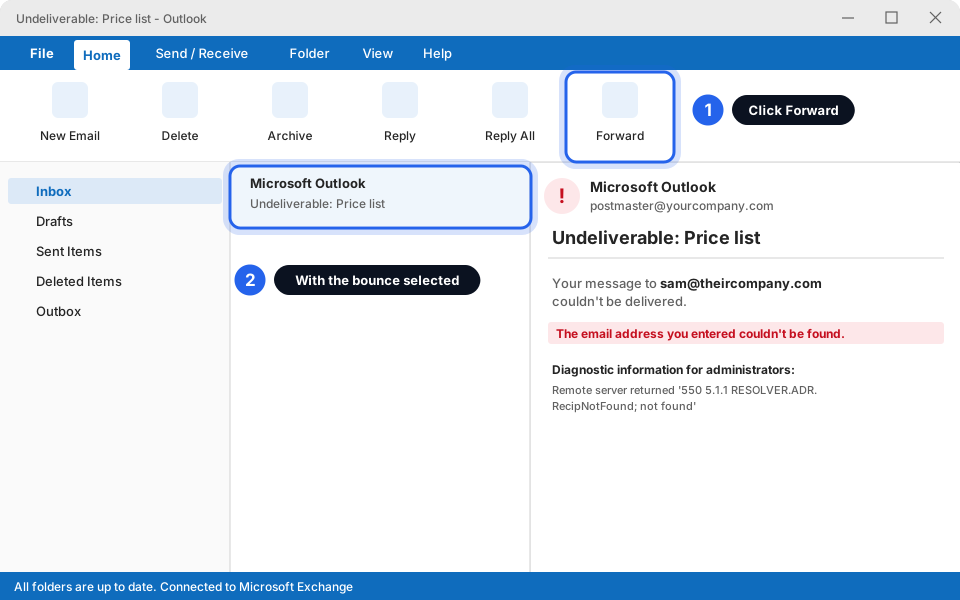
    Outlook with the bounce message selected and the Forward button highlighted
    Select the bounce, then click Forward.Click picture to enlarge
  3. Type info@skytechsvg.com in the To box

    Write one line above the message, such as "This bounced. Can you check?" Leave everything below it exactly as it is.
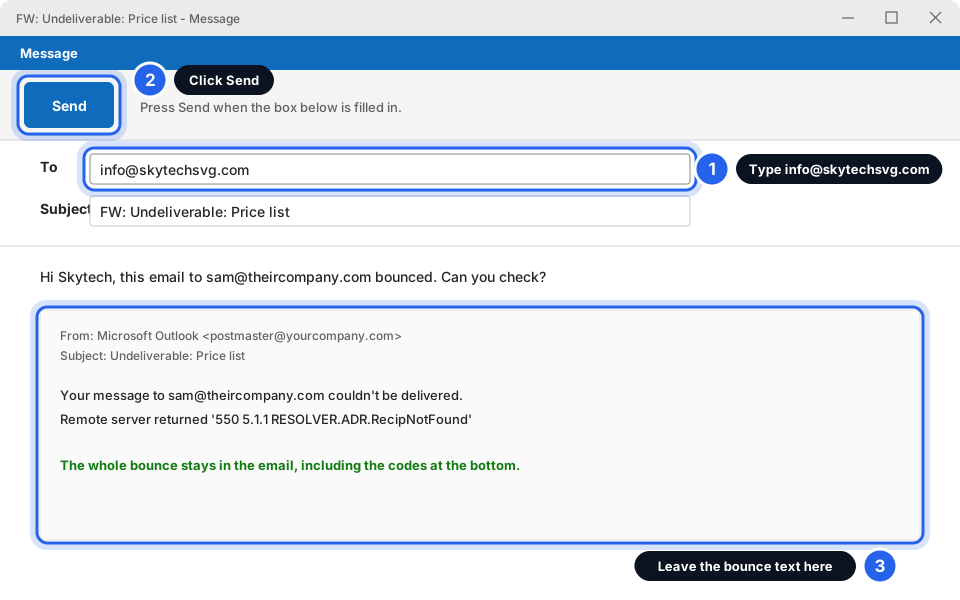
    Forwarded message with info@skytechsvg.com in the To box and the bounce text below, plus the Send button highlighted
    Address it to us, leave the bounce text, then click Send.Click picture to enlarge
  4. Click Send

    We will reply as soon as we have looked at it.

    Can't forward it? Open the bounce, scroll to the very bottom, and take pictures of the whole message in parts. See Take a screenshot to send us.

Bounce sent to us

Tell us who you were emailing and what you were sending (for example a price list). We will check and let you know.

I'm getting bounces for emails I never sent

This is scary, but it is common and usually harmless. Spammers sometimes fake your address as the sender on thousands of junk messages. When those messages fail, the bounces come to you, even though you never wrote them. It does not mean someone has your password.

Do not reply to these bounces, and do not click links or open attachments inside them. Some are scams dressed as bounces. See How to spot a scam (phishing) email.

First, find out which situation you are in.

  1. Click Sent Items

    It is in the folder list on the left. Look for the messages the bounces talk about (same subject, or sent to the same addresses). Check the date and time on the bounce.
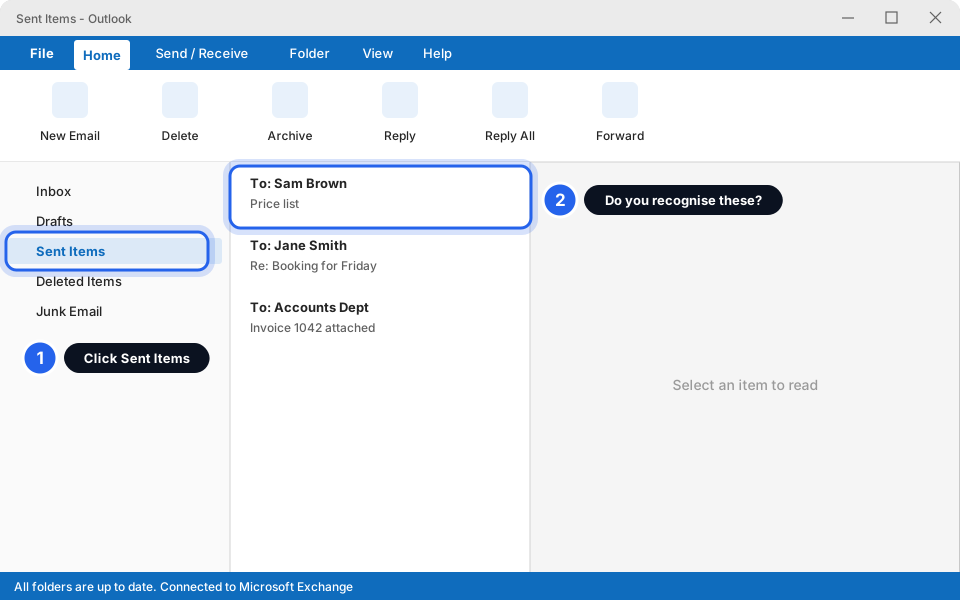
    Sent Items folder open with a ring around the list of sent messages
    Look for the messages the bounce mentions.Click picture to enlarge
  2. Match what you find

    Pick the box below that fits.

A
The messages are NOT in Sent Items. Someone faked your address. Your account is fine. Delete the bounces. If you get lots every day, tell us so we can check your email protection.
B
The messages ARE in Sent Items, and you didn't write them. Your account may have been taken over. Change your password now (Microsoft 365: aka.ms/sspr, or message us if that page says you can't reset; Skytech-hosted: message us). Don't delete the messages, because we need to see them. Tell your colleagues not to open anything from you until we say it's safe.
Not sure which one you are? Message us and forward two or three of the bounces. We will tell you quickly. Skytech will never ask for your password by email or text.

Still not working?

The bounce says "delayed" and it has been a day

The system is still retrying. If it turns into a failure message later, match it in the table above. If it matters, phone the person to check the address is right, and forward us the message.

My customer says they never got my email, but I got no bounce

Ask them to check their Junk folder first. Then check your own Sent Items to be sure it really went. If it did and they still can't find it, message us with the time and their address.

I resent the email five times and it keeps bouncing

Please stop. Resending cannot fix a wrong address or a blocked message, and may annoy the other person. Forward the bounce to us.

The bounce is from a name I don't know, or looks odd

Real bounces come from names like Postmaster or Mail Delivery System, and talk about a message you really sent. If you don't recall sending it, read the last section above and don't click anything inside.

Is it my fault when an email bounces?

Almost never. It is usually a typo, a full mailbox on their side, or their spam filter. A quick look at the bounce shows which.

Still stuck? Forward us the bounce.

Send the whole bounce to info@skytechsvg.com, or message us and tell us who you were emailing.

Pictures are simplified drawings of Outlook and Windows. Your screen may look slightly different depending on your version. Skytech will never ask for your password by email or text. Updated October 2026.