The red flags
This is a made-up scam email. The numbers show the warning signs. One flag alone is a reason to be careful. Two or three together mean it's almost certainly a scam.
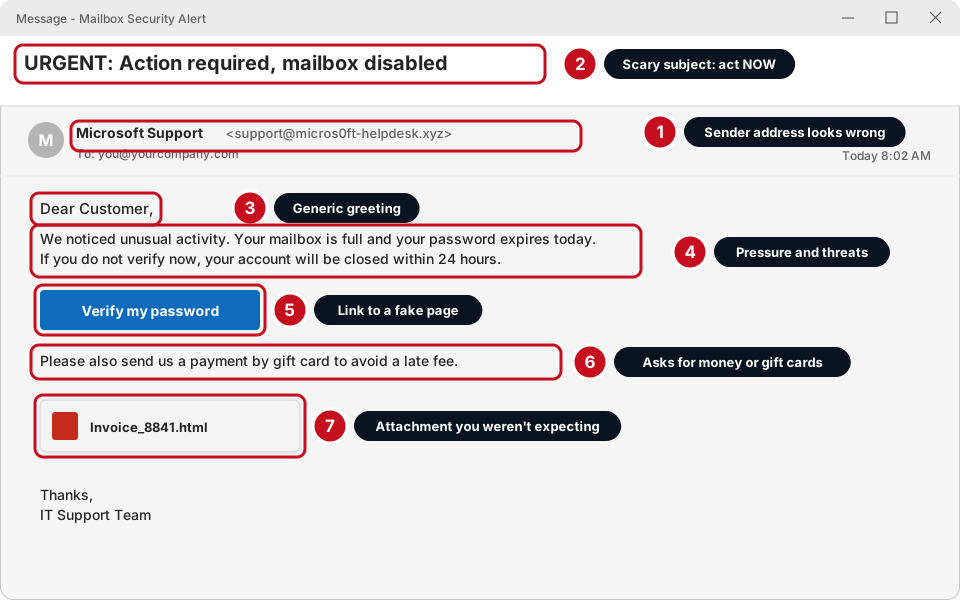
- 1. The sender's address is wrong
- The name says Microsoft Support but the address in the brackets is something else (micros0ft-helpdesk.xyz, with a zero). Real companies send from their own address. Always read the address, not just the name.
- 2. A scary or urgent subject
- URGENT, Final warning, Account suspended, Action required.
- 3. A generic greeting
- Dear Customer, Dear User, Dear Sir/Madam instead of your name.
- 4. Pressure and threats
- “Do it today or lose your account.” Scammers want you to act before you think.
- 5. A link or button to sign in
- Often to a fake page that looks real. See how to check a link.
- 6. Asking for a password, money or gift cards
- No real company or boss asks for passwords by email, or for gift cards. Skytech will never ask for your password by email or text.
- 7. An attachment you weren't expecting
- Especially .html, .zip, .exe, or a PDF you didn't ask for. Fake invoices are the most common.
Check a link before you click
The words of a link can say one thing while the real address goes somewhere else. You can see the real address without clicking.
-
Hover your mouse over the link. Don't click
Slowly move the mouse pointer on top of the link or button and wait one second. A little box pops up showing where it really goes. On a phone: press and hold the link until a preview shows (don't let go on Open).
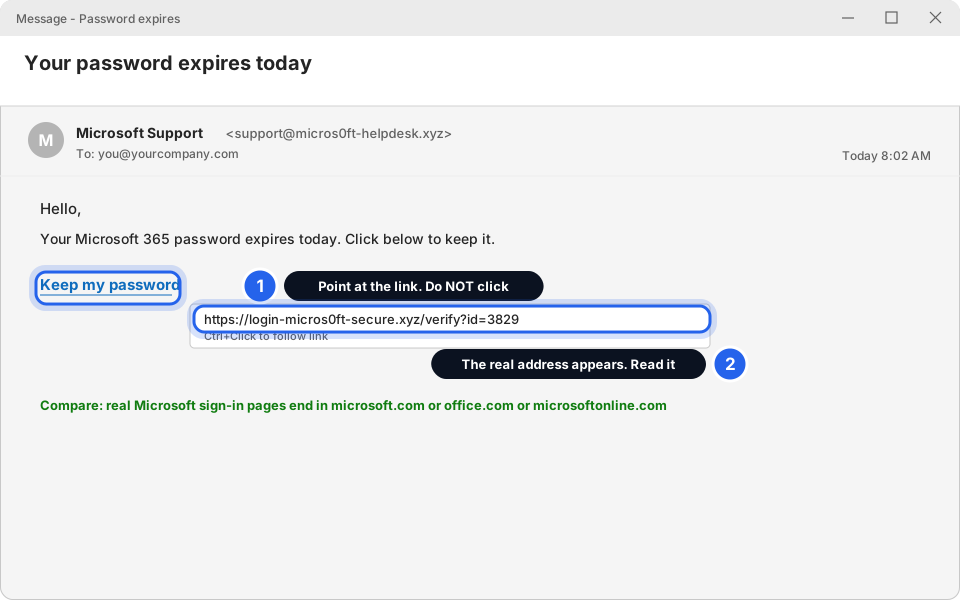
The real address shows in a small box.Click picture to enlarge -
Read the address from the end of the first part
Look at the part just before the first single slash. That is who owns the page. Everything before it is decoration.
- Real
- login.microsoft.com/...
- Real
- outlook.office.com/...
- Fake
- login.microsoft.com.secure-check.xyz/... (the owner is secure-check.xyz)
- Fake
- micros0ft-login.com (a zero, not an o)
-
If you're not sure, don't click
Open your web browser yourself and type the real address (for example office.com). If there really is a problem with your account, you'll see it there.
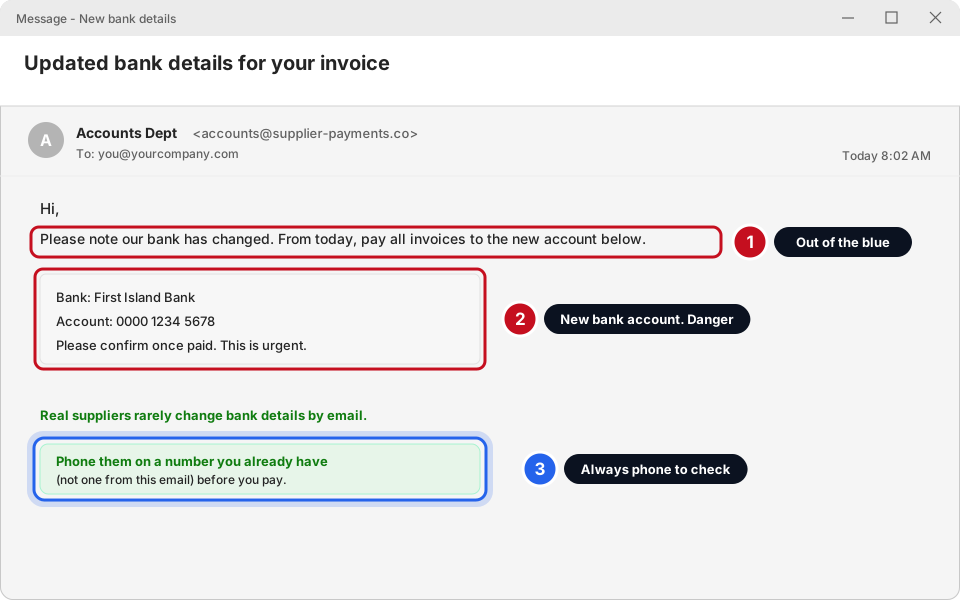
“We've changed our bank details”
This is the scam that costs businesses the most money. A criminal pretends to be one of your suppliers and says “please pay the new account from now on”.
What to do with a suspicious email
-
Don't click, don't reply, don't open attachments
Leave it alone. Replying tells the scammer your address is real. If you've already opened it but not clicked anything, you are fine.
-
Click the message, then click Report > Phishing in Classic Outlook
Click the message in your list once. On the Home tab at the top, click Report Message (it may just say Report). Choose Phishing. Click Report if it asks you to confirm.
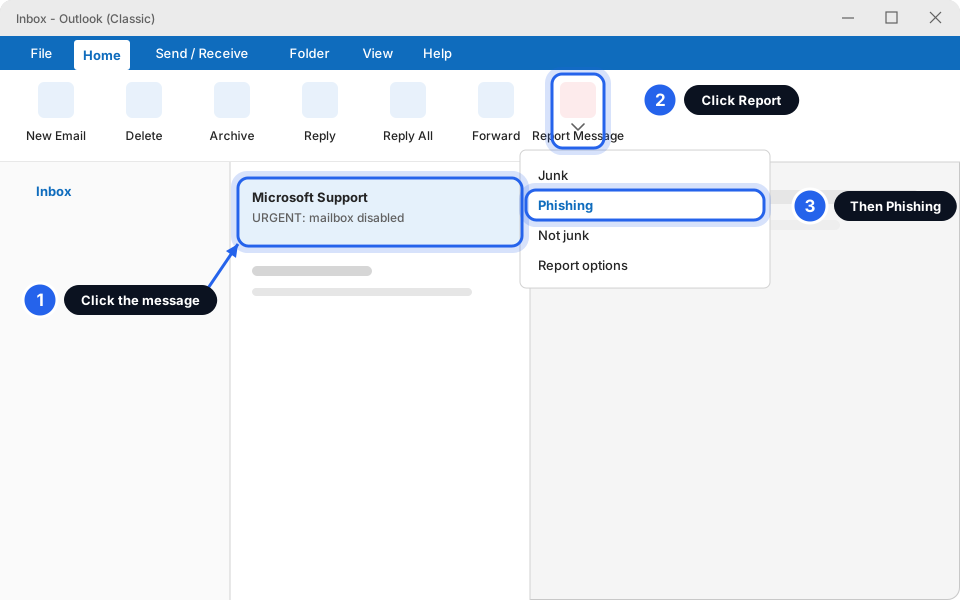
Select the message, Report, Phishing.Click picture to enlarge -
Or in New Outlook: Report > Report phishing
Click the message once. On the Home tab click the small arrow next to Report, then Report phishing. Click the arrow and pick from the list. Clicking the main button alone may report the message straight away.
Don't see a Report button? Your Outlook may use a different one. Don't worry, just send it to us instead (next step).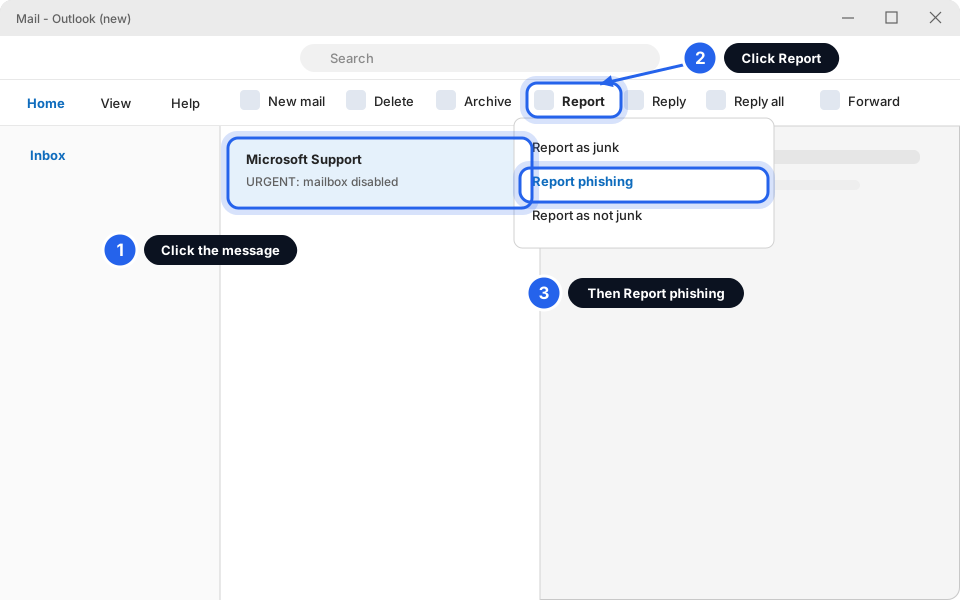
Select the message, Report, Report phishing.Click picture to enlarge -
Send it to Skytech
The easiest and safest way: take a picture of the email (how to take a screenshot) and send it on WhatsApp to +1 784 492 3795. Or email info@skytechsvg.com. Then delete the email.
I already clicked or typed my password
Take a breath. It happens to everyone and it's not your fault. Scammers are professionals. What matters is acting fast. Do these in order:
-
Change your password now
Use the steps in I forgot my password (works even if you can't sign in) or change your password. If you use the same password anywhere else, change it there too.
-
Message Skytech right away
Tell us what you clicked, roughly when, and whether you typed a password. Don't delete the email. We may need it. If you can, send a screenshot.
Hi Skytech, I think I clicked a link in a scam email at about [time]. I [did / did not] type my password. My email is [you@yourcompany.com]. Please help.You won't be in trouble. We'd much rather hear about it in five minutes than five days. Quick action usually stops any harm. -
If you gave bank or card details, call your bank
Tell your bank straight away. They can block the card or stop a payment. If you paid a changed bank account, ring your bank and ask for a recall as soon as possible.
-
Watch for approval requests
If your phone asks you to approve a sign-in you didn't start, tap No, it's not me. See never approve a sign-in you didn't start.
Questions people ask
It looks like it's from my boss
Scammers copy names. Check the email address, not just the name. If it asks for money, gift cards or a fast payment, phone your boss on their usual number.
The email has my name and company in it. Does that make it real?
No. Scammers find names and companies online. It can still be fake.
The link starts with https and has a padlock. Is it safe?
No. Scam sites use https too. The padlock only means the connection is private, not that the site is honest. Read the address as in Check a link.
I'm getting lots of bounce emails for emails I never sent
Scammers can fake your address as the sender. It doesn't mean you were hacked. Don't open attachments in the bounces. Tell us. See My email bounced.
Does this happen on WhatsApp and text messages too?
Yes. The same rules apply to links in texts and WhatsApp: don't click, check, and ask us.