Why updates matter
Most Windows updates fix security holes. Criminals look for computers that are not updated and use those holes to get in and lock files or steal passwords. Updates also fix bugs, crashes and slow-downs. An update that waits for weeks is the most common reason a computer is unsafe or acting strangely.
Check for updates
-
Open Settings
Click the Start button (the Windows logo in the middle of the bottom bar), then click Settings (the gear). Or press the Windows key and I together.
-
Click Windows Update
It is the last item in the list on the left side of Settings.
-
Click Check for updates
It is the blue button at the top-right. Wait a minute while Windows looks. It may say You're up to date, or start to download updates by itself.
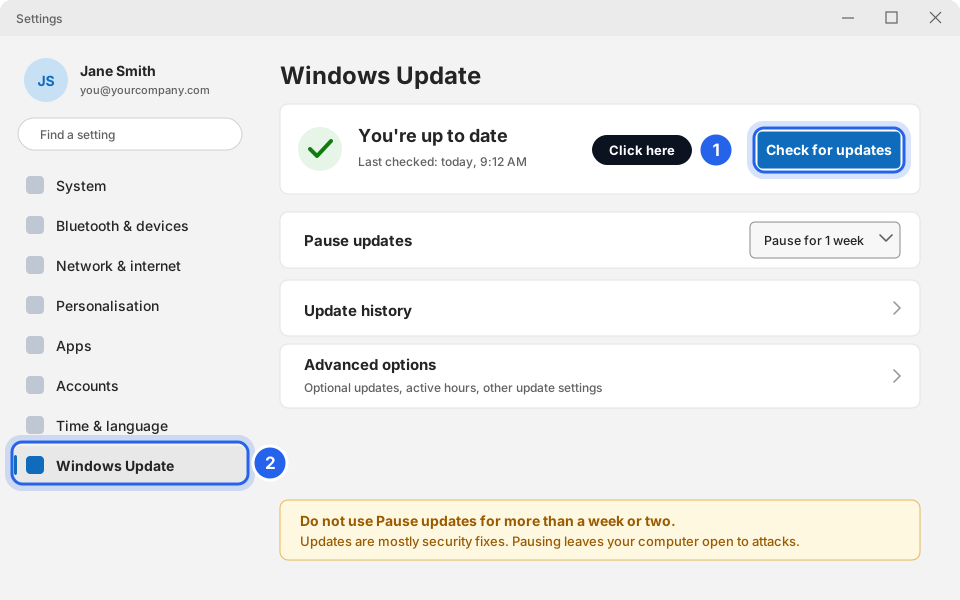
Settings, Windows Update, Check for updates.Click picture to enlarge -
Click Download & install or Install now if you see it
If updates are found, Windows may start installing them straight away, or show a button to click. Let it finish. You can keep working while it downloads.
If you see Download & install all, click it too. That is the same thing.
Restart when it asks
Updates only finish after a restart. If you see Restart required, the update is waiting for you.
-
Save your work, then click Restart now
The computer closes everything and installs the update. Keep a laptop plugged in. Sign in again when it comes back.
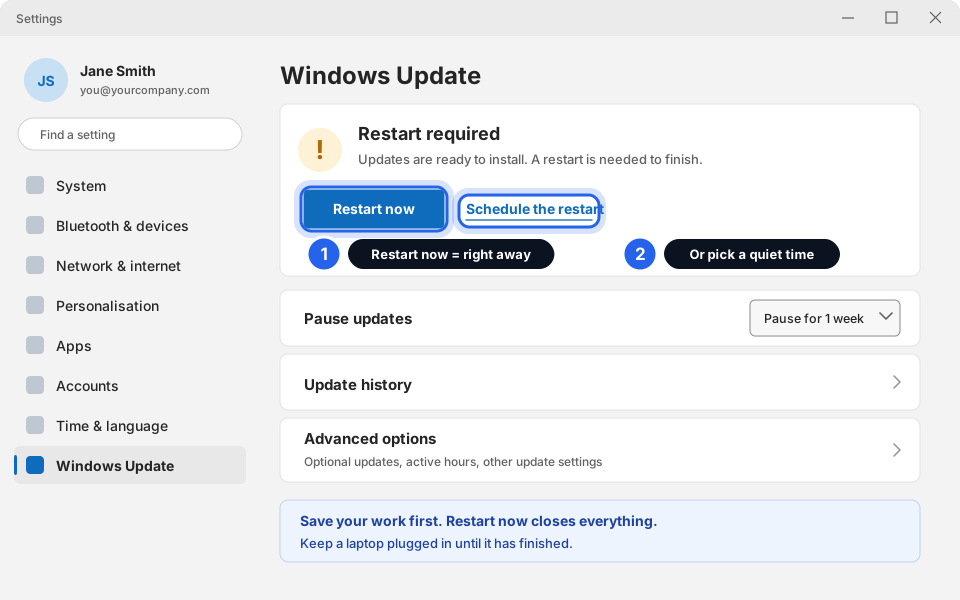
Restart now or Schedule the restart.Click picture to enlarge -
Or click Schedule the restart for a quiet time
Switch Schedule a time to On. Click Pick a time and choose a time when you are away but the computer is still on, for example 1:00 AM. Click Pick a day and choose the day. Leave the computer on and plugged in.
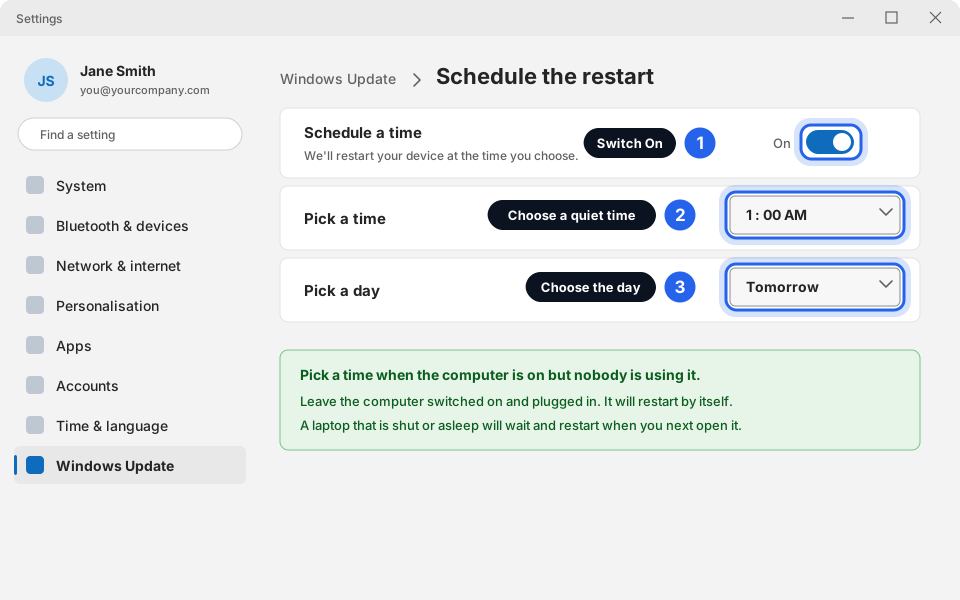
Choose a quiet time.Click picture to enlarge Do not leave the restart waiting for weeks. Pause updates is only for a very short time, for example a busy week. A paused computer misses security fixes. -
Or use the Start menu
Click Start, then the Power button at the bottom-right. If an update is waiting you will see Update and restart. Click it. See Restart your computer properly for the pictures.
Stop updates restarting while you work
Set your working hours so Windows does not restart during the day.
-
Open Advanced options
On the Windows Update page, click Advanced options (near the bottom of the page).
-
Click Active hours
Scroll down to Active hours. If it says Manually, click Change and set the times you work, for example 8:00 AM to 6:00 PM. If it says Automatically, Windows learns your hours for you. That is fine too.
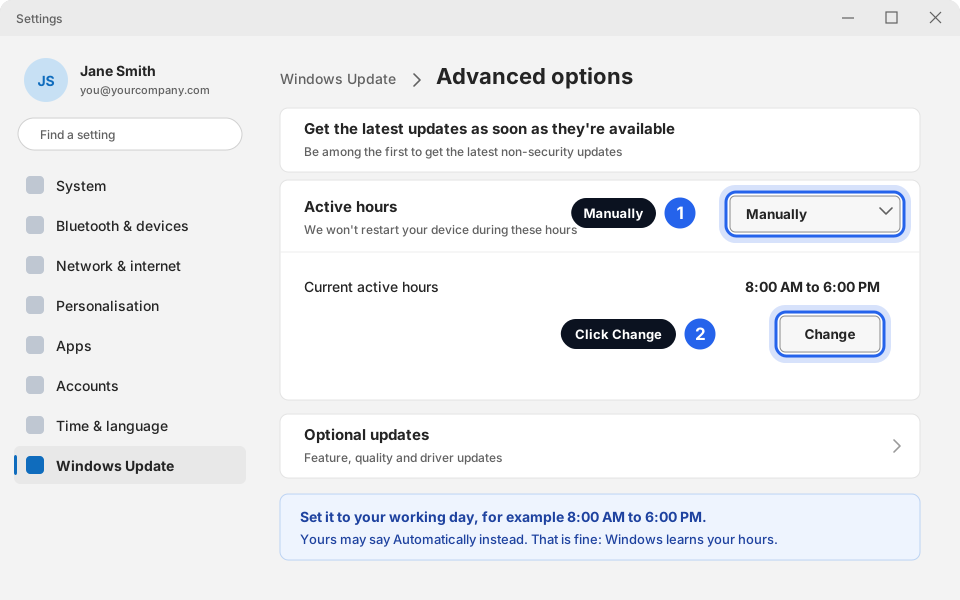
Set Active hours to your working day.Click picture to enlarge
Office and Microsoft Store apps
Word, Excel, Outlook and the other Microsoft 365 apps update on their own, but you can check by hand.
-
Open Word or Excel, then click File
It is at the top-left. Then click Account (at the bottom-left). In Outlook Classic the same page is File, Office Account.
-
Click Update Options, then Update Now
Wait while it downloads and installs. Close your Office programs when it asks.
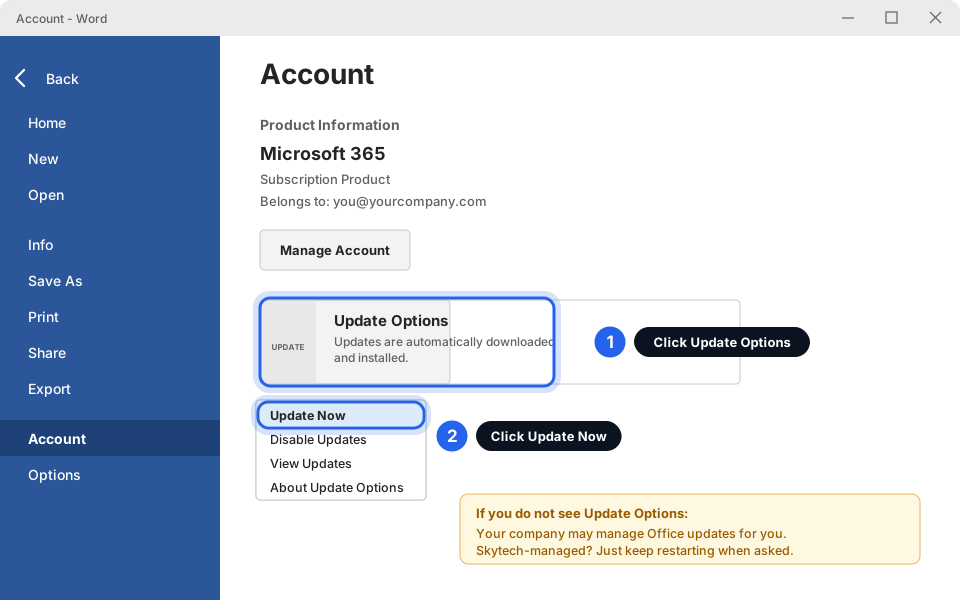
File, Account, Update Options, Update Now.Click picture to enlarge No Update Options button? Your company may manage Office updates for you. Nothing to do. -
Microsoft Store apps (optional)
Open the Microsoft Store from the Start menu, click Library (bottom-left), then Get updates.
If an update looks stuck
A blue screen that says Working on updates with a percentage can sit on the same number for 10 or 20 minutes. This is normal.
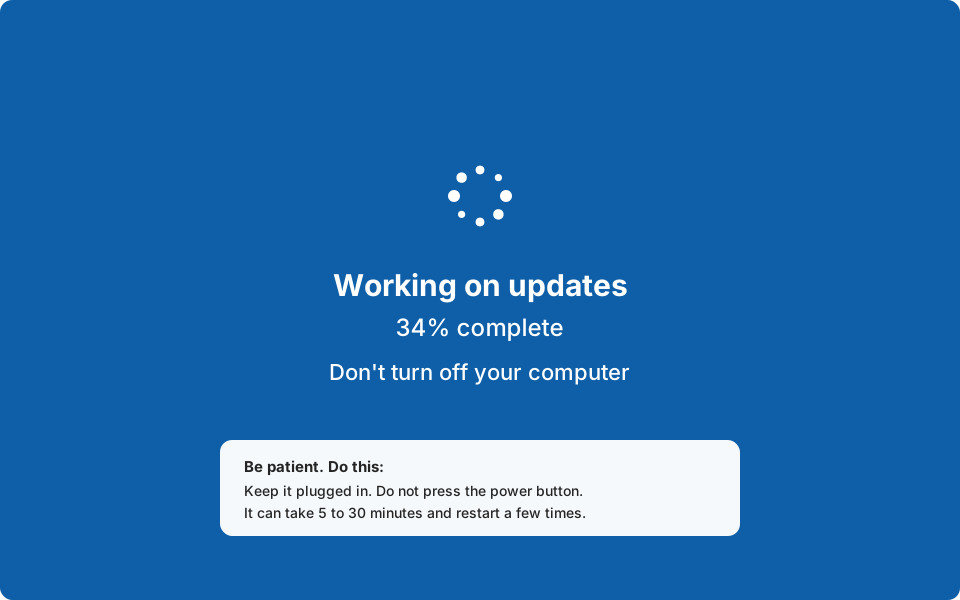
- Wait at least 30 minutes. Keep it plugged in.
- Do not hold the power button while it says Working on updates. That can damage Windows.
- After 30 minutes with no change at all (the percentage has not moved and the drive light is off), message us before doing anything.
Up to date
Go to Windows Update again. It should say You're up to date. Restart weekly and you will rarely see a pending update.
Still not working?
It says "Restart required" every day
Choose Restart (not Shut down) and let it finish all the updates, even if it restarts twice. If it comes back again the next day, tell us.
Check for updates shows an error or stays on "Checking"
Make sure you are connected to the internet. Restart the computer and try again. If you see an error code (for example 0x80...), take a photo of the screen and message us: Take a screenshot to send us.
Windows Update says my settings are managed by my organisation
That is normal on a company computer. Updates are controlled by your IT setup. You can still restart when asked. Tell us if updates are not arriving.
The update made something stop working
Restart once more first. If it is still broken, tell us what changed and when. Do not uninstall anything yourself.
My computer is slow after updating
Give it a few hours of normal use to finish its background work, restart, then try Computer running slow? Try these first.