Why this matters
How to send a request
-
Collect the details for each item
Before you write the email, make sure you have all of these. They are the same fields as on the template below.
- Outlet(s)
- Which outlet, and which terminals (all of them, or just the bar).
- Button name
- Exactly as it should appear. Keep it short, because long names get cut off. Around 16 characters is a safe limit.
- Price
- And say whether it includes tax and service charge.
- Screen / category
- Where the button goes, for example Drinks, Mains, Breakfast.
- Options
- Sides, cooking temperature, sizes and so on.
- Printer
- Which kitchen or bar printer the order should print to.
- Dates
- Start date, and end date for specials.
- Colour
- Optional. Tell us a button colour if you want one.
- Approved by
- Who signed the change off.
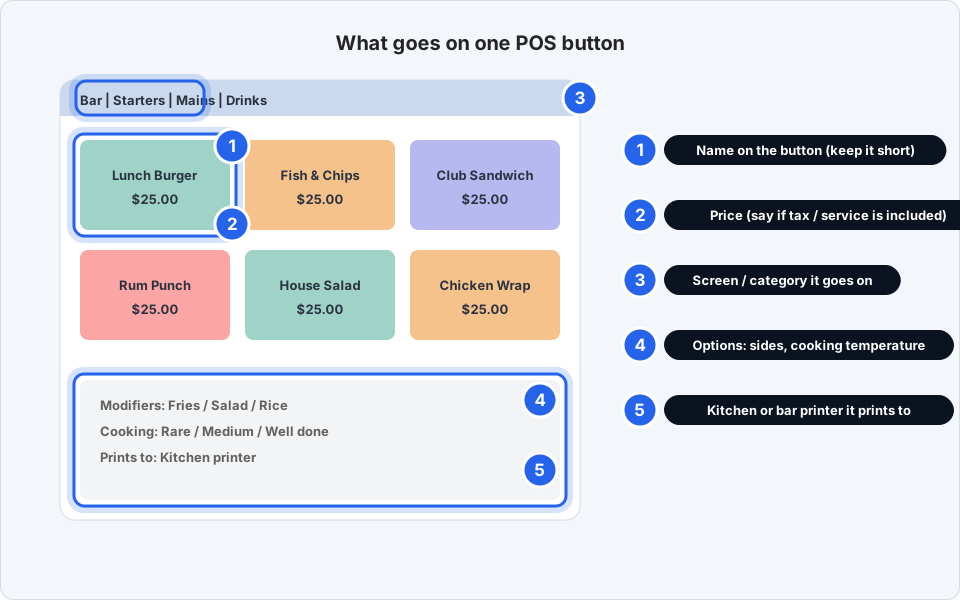
What each part of a button means.Click picture to enlarge -
Copy the template and fill it in
Click Copy, paste it into a new email, and replace the blanks. Delete any line that does not apply.
Changing a price, or removing an item? Use the same template and mark the action as CHANGE or REMOVE.
Subject: POS menu change - [Outlet] - starts [date] Outlet(s) / terminal group: Approved by: For each item (copy this block, or use a table): Action: NEW / CHANGE / REMOVE Item name on the button (keep it short, about 16 characters): Price: $ ____ (includes tax / service charge? YES / NO) Category / screen it goes on: Modifiers / options (sides, cooking temperature, etc.): Prints to (kitchen / bar printer): Start date: End date (specials only): Button colour (optional): -
Several items? Put them in a table
For more than two or three items, a table in the email is fine, or attach a spreadsheet. One row per item, with a column for each field. Keep the whole change in one email.
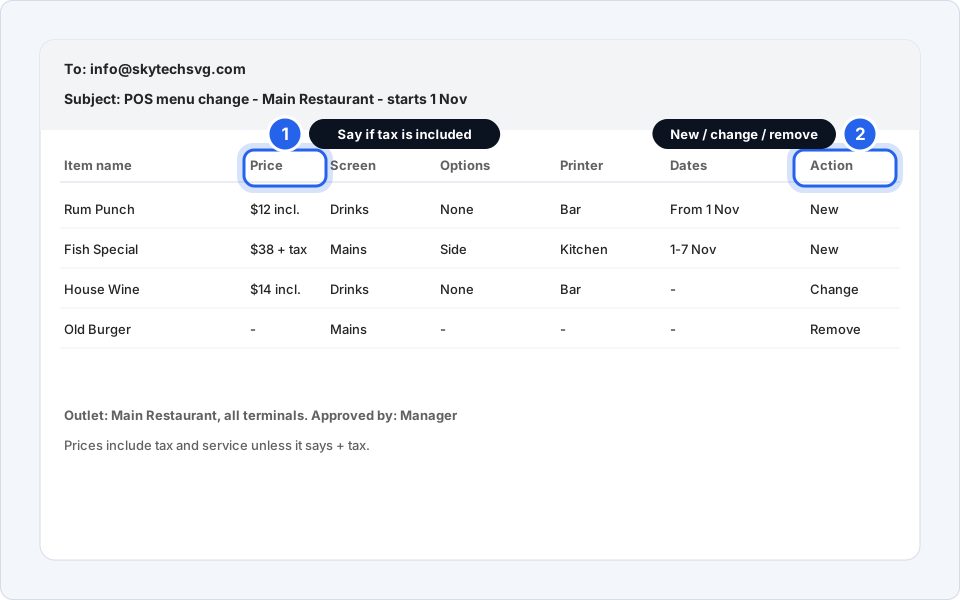
Example of a complete request.Click picture to enlarge -
Send it to info@skytechsvg.com
Put the outlet and the start date in the subject line, for example POS menu change - Main Restaurant - starts 1 Nov. That helps us find it later.
-
Give us at least 2 working days
Send the request at least 2 working days before the start date. A same-day change is possible only if it is really urgent, so message us on WhatsApp as well as emailing.
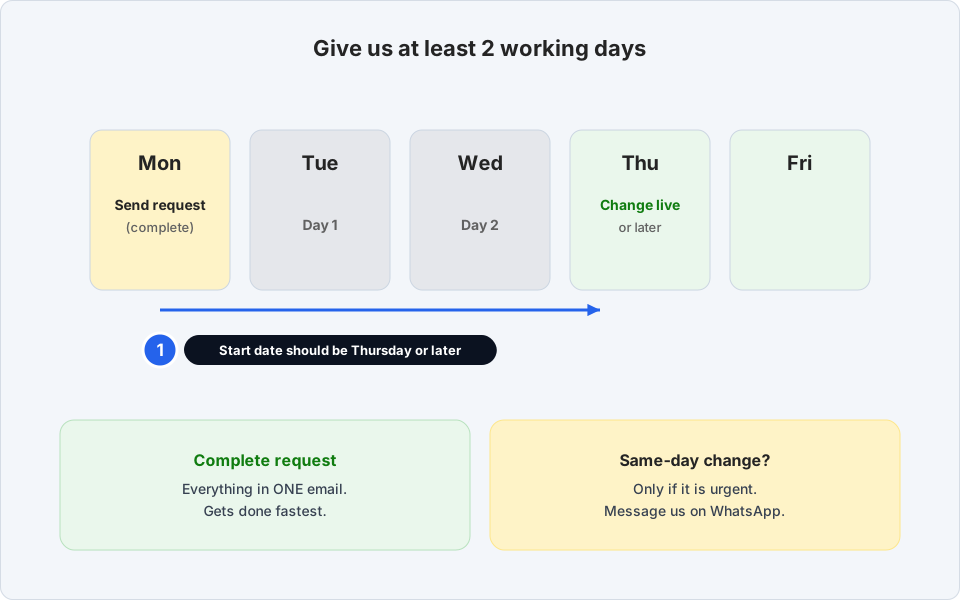
Plan for two working days.Click picture to enlarge -
Made a mistake? Reply in the SAME email
Do not start a new email. Open the email you already sent, click Reply, and type CORRECTION: at the very top, then say exactly what changed.
Never send a second, separate email for a correction. Two emails about the same item is how the wrong price ends up on the till.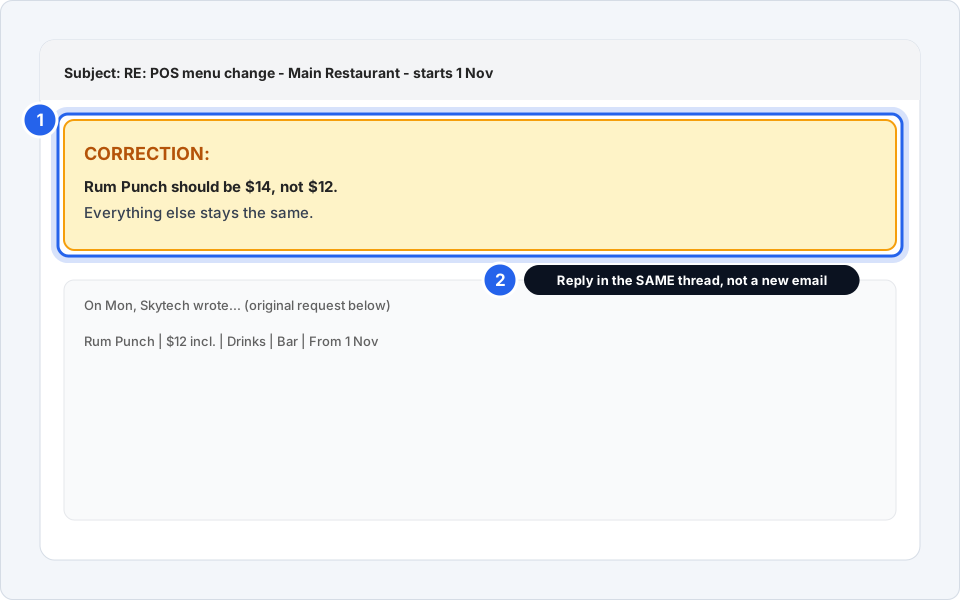
One thread, with CORRECTION at the top.Click picture to enlarge
Request sent
We will confirm when the change is done. When it goes live, check one or two of the new buttons on a terminal before the first service.
Questions we hear a lot
Do I have to use the template?
No, but it helps. Any email with all the details works just as well. If something is missing we have to ask, which adds a day or more.
Can I send a spreadsheet instead?
Yes. A simple spreadsheet with one row per item and a column for each field is perfect. Still put the outlet and start date in the email subject.
Do I need to tell you when a special ends?
Yes, please give an end date. We can set the item to disappear on that day. If you do not give one, we will assume it stays until you tell us otherwise.
I only need to change a price
Use the same template. Put the item name, the new price, say whether tax is included, and the date it should change. Mark the action as CHANGE.
The change is not on the terminal
Restart the terminal once, then check again. If it is still missing, reply to your original email with the outlet and terminal. See also POS terminal not working.